1. Уводзіны
Дзякуй за пакупкуasing the LG 43-Inch Class QNED AI 4K Smart TV. This manual provides essential information for the safe and efficient operation of your television. Please read it thoroughly before use and keep it for future reference.
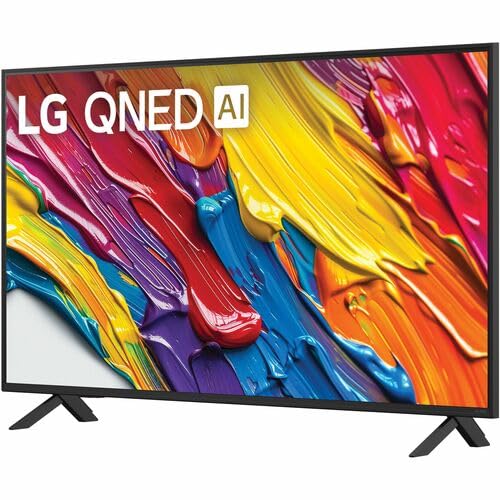
The LG QNED AI 4K TV offers vivid, immersive color with its wide color gamut technology, enhanced by the α7 AI Processor Gen8. It intelligently optimizes picture and sound based on content. Powered by LG webOS 24, it provides a streamlined streaming experience with customizable Quick Cards and the Magic Remote. Enjoy virtual 5.1 surround sound, FILMMAKER MODE, and advanced gaming features like FreeSync, VRR, and GeForce NOW.
2. Інфармацыя па бяспецы
Заўсёды выконвайце асноўныя меры бяспекі пры выкарыстанні гэтага вырабу, каб знізіць рызыку пажару, паражэння электрычным токам або траўмаў.
- Не падвяргайце тэлевізар уздзеянню дажджу або вільгаці.
- Не адчыняйце тэлевізарasinг; звяртайцеся да кваліфікаванага персаналу па ўсё абслугоўванне.
- Ensure proper ventilation and do not block ventilation openings.
- Выкарыстоўвайце толькі шнур сілкавання, які пастаўляецца з тэлевізарам.
- Трымайце тэлевізар далей ад крыніц цяпла і прамых сонечных прамянёў.
- Avoid placing heavy objects on the power cord or TV.
3. Што ў скрынцы
Праверце наяўнасць усіх кампанентаў:
- LG 43-Inch Class QNED AI 4K Smart TV
- Сілавы кабель
- Пульт дыстанцыйнага кіравання (2 батарэйкі тыпу AAA ў камплекце)
- Кампаненты падстаўкі
- Кіраўніцтва карыстальніка (гэты дакумент)
4. Настройка
4.1 Прымацаванне падстаўкі
Carefully place the TV screen-down on a soft, flat surface. Attach the stand components to the designated slots on the bottom of the TV using the provided screws. Ensure the stand is securely fastened before placing the TV upright.
Выява: Задняя частка view of the LG 43QNED82AUA TV with its stand.
4.2 Насценны мантаж (дадаткова)
This TV supports VESA mount standard 200 x 200 mm. For wall mounting, remove the stand and use a compatible wall mount bracket (sold separately). Follow the instructions provided with your wall mount.
4.3 Падключэнне прылад
Connect your external devices (cable box, Blu-ray player, gaming console, etc.) to the appropriate ports on the TV. The TV features 3 HDMI ports, 1 USB port, Ethernet, and S/PDIF (Optical) for audio output.

Image: Connectivity ports on the back of the LG 43QNED82AUA TV.
4.4 Уключэнне харчавання
Plug the power cable into the TV and then into a wall outlet. Press the power button on the remote control or on the TV to turn it on. Follow the on-screen instructions for initial setup, including network connection and channel scanning.
5. Кіраванне тэлевізарам
5.1 Пульт дыстанцыйнага кіравання
The included Magic Remote allows for intuitive control with point-and-click functionality, voice commands, and a scroll wheel. Insert the two AAA batteries (included) into the remote control.
5.2 WebРазумная платформа OS 24
Ваш тэлевізар працуе на працэсарах LG webOS 24 operating system. Navigate through apps, settings, and inputs using the customizable Quick Cards. Access popular streaming services like Netflix, Prime Video, Disney Plus, HBO Max, and Apple TV directly from the home screen.
5.3 Налады выявы і гуку
Access the settings menu to adjust picture modes (e.g., Standard, Vivid, Cinema, Filmmaker Mode) and sound modes (e.g., AI Sound Pro, Standard, Cinema). The α7 AI Processor Gen8 automatically optimizes these settings based on the content being viewрэд.

Image: Dynamic QNED Color representation.
6. Smart Features and AI
6.1 AI Picture and Sound
The α7 AI Processor Gen8 enhances brightness, improves sound, and refines picture detail with 4K upscaling and Dynamic Tone Mapping. AI Sound Pro provides virtual 5.1 surround sound, and WOW Orchestra integrates TV speakers with compatible LG soundbars for an enhanced audio experience.
6.2 Voice Assistance and AI Search
Your TV has Alexa Built-in. Press the Alexa button on your remote to activate voice commands. Utilize AI Пошук personalized recommendations and to find content quickly. The TV also supports Google Assistant, Apple AirPlay 2, and Google Cast for seamless integration with your smart home ecosystem.

Image: LG AI Search interface.
7. Гульнявыя функцыі
The LG QNED AI 4K TV is designed for an optimal gaming experience with a 60 Hz native refresh rate, which can be boosted up to 144 Hz with VRR (Variable Refresh Rate) enabled. It supports FreeSync and features LG Game Optimizer and Game Dashboard for quick access to gaming settings.
- FreeSync & VRR: Змяншае разрывы і заіканне экрана для больш плыўнага геймплэю.
- Аптымізатар гульняў і панэль кіравання: Centralized hub for adjusting game settings, including genre-specific picture modes.
- Воблачныя гульні: Access GeForce NOW and Xbox Cloud Gaming (subscriptions and compatible controllers required).
- ALLM (аўтаматычны рэжым нізкай затрымкі): Automatically switches to a low-latency mode when a game console is detected.

Image: Gaming experience on the LG 43QNED82AUA TV.
8. Сувязь
Your LG QNED AI 4K Smart TV offers a variety of connectivity options:
- HDMI: 3 ports for connecting external devices.
- USB: 1 port for media playback or connecting USB devices.
- Ethernet: Для праваднога падключэння да Інтэрнэту.
- Wi-Fi: Убудаваны модуль для бесправаднога доступу ў Інтэрнэт.
- Bluetooth 5.0: Для падключэння бесправадных навушнікаў, саўндбараў або іншых прылад Bluetooth.
- Аптычны (S/PDIF): Для лічбавага аўдыёвыхаду на гукавыя сістэмы.
- Адлюстраванне экрана: Supports AirPlay 2 and Google Cast for casting content from mobile devices.
9. Тэхнічнае абслугоўванне
9.1 Чыстка тэлевізара
Unplug the TV before cleaning. Use a soft, dry cloth to wipe the screen and exterior. For stubborn marks, lightly dampПрацярыце тканіну вадой або спецыяльным сродкам для чысткі экранаў. Пазбягайце выкарыстання агрэсіўных хімічных рэчываў або абразіўных матэрыялаў.
9.2 Абнаўленне праграмнага забеспячэння
Ensure your TV's software is up to date for optimal performance and new features. Software updates auto-download when connected to the internet. If "auto-update" is disabled, you will receive a prompt to update manually.
10. Выпраўленне непаладак
Калі ў вас узніклі праблемы з тэлевізарам, звярніцеся да наступных распаўсюджаных рашэнняў:
| праблема | Рашэнне |
|---|---|
| Няма ўлады | Check power cable connection, wall outlet, and remote batteries. |
| Няма выявы, але гук ёсць | Verify input source, check cable connections, try a different HDMI port. |
| Няма гуку, але выява ёсць | Check volume, mute status, audio output settings, and external audio device connections. |
| Пульт дыстанцыйнага кіравання не працуе | Replace batteries, ensure no obstructions between remote and TV, re-pair Magic Remote if necessary. |
| Нізкая якасць выявы | Adjust picture settings, check source resolution, ensure strong signal for broadcast channels. |
| Немагчыма падключыцца да Wi-Fi | Restart router, check Wi-Fi password, ensure TV is within range, try wired Ethernet connection. |
For further assistance, please refer to the full electronic manual available on the LG support webна сайце або звярніцеся ў службу падтрымкі кліентаў LG.
11. Тэхнічныя характарыстыкі
| Асаблівасць | Дэталь |
|---|---|
| Памер экрана | 43 цалі |
| Тэхналогія адлюстравання | Святлодыёд (QNED) |
| дазвол | 4K (3840 x 2160) |
| Частата абнаўлення | 60 Hz (Native), up to 144 Hz (VRR) |
| Працэсар | Працэсар α7 AI Gen8 |
| Падтрымка HDR | HDR10, HLG |
| Аперацыйная сістэма | webАС 24 |
| Сувязь | Wi-Fi, Bluetooth 5.0, Ethernet, 3x HDMI, 1x USB, Optical (S/PDIF) |
| Галасавыя памочнікі | Alexa Built-in, Google Assistant compatible |
| Памеры (з падстаўкай) | 10.1" Г x 38.1" Ш x 25" У |
| Вага (без падстаўкі) | 20.7 фунта |
| Стандарт мацавання VESA | 200 х 200 мм |
| Энергаспажыванне | 82 ват |
| Гадавое спажыванне энергіі | 152 кілават-гадзін у год |

Image: LG 43QNED82AUA TV dimensions.
12. Гарантыя і падтрымка
12.1 Інфармацыя аб гарантыі
This LG TV comes with a 1 Year Parts & Labor Limited Warranty. Please retain your proof of purchase for warranty claims. For full warranty terms and conditions, refer to the warranty card included with your product or visit the official LG webсайт.
12.2 Падтрымка кліентаў
For technical support, product registration, or service inquiries, please visit the LG support website or contact their customer service hotline. Contact information can be found on the LG official webна сайце або ў дакументацыі, якая пастаўляецца з вашым тэлевізарам.