1. Уводзіны
This manual provides instructions for the operation and maintenance of your LIGE FV26-F Smartwatch. Please read this manual carefully before using the device to ensure proper function and to maximize its features. The smartwatch is designed for women, featuring a round display, silver stainless steel band with diamond accents, and a silicone strap option.
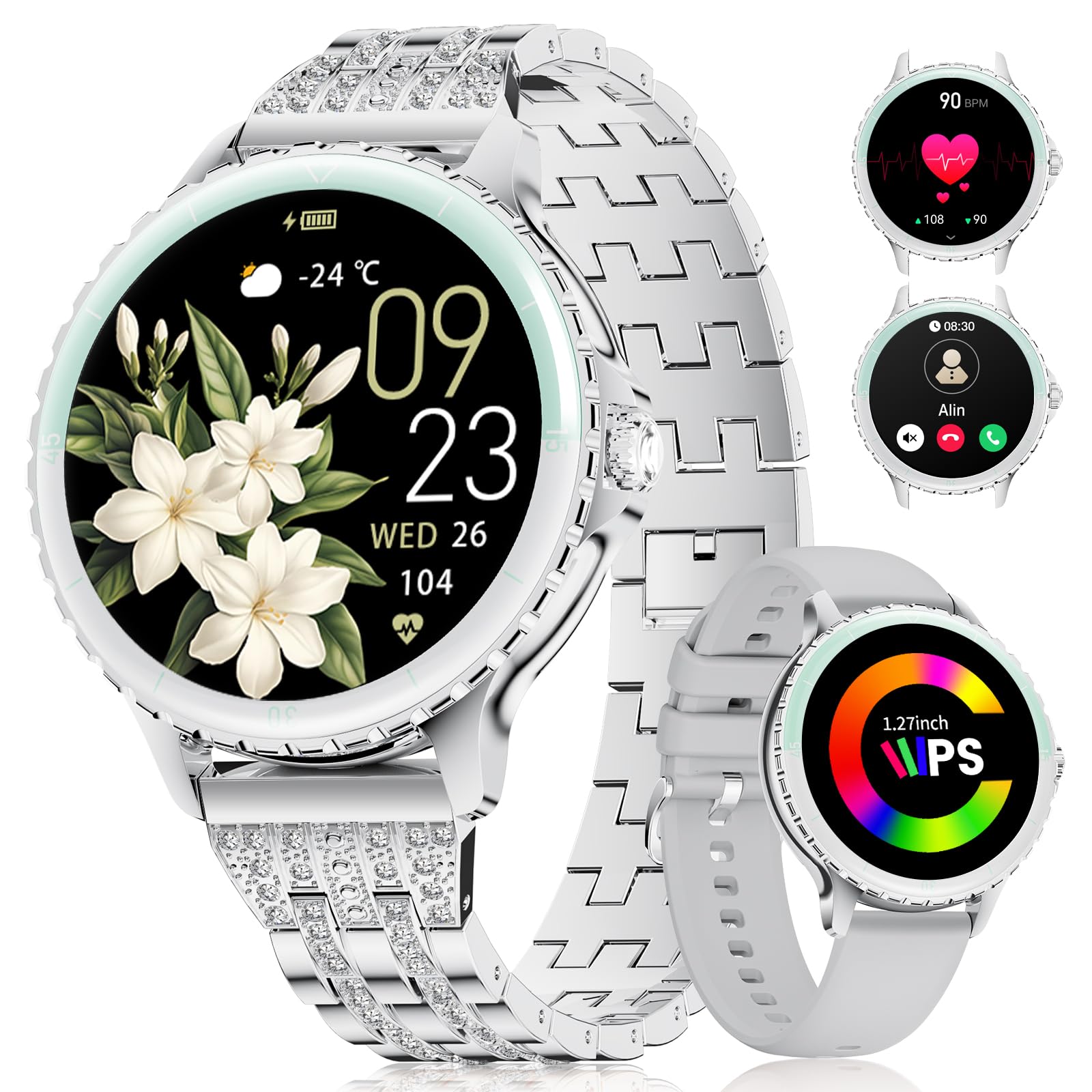
Image: LIGE FV26-F Smartwatch displaying its elegant design with both stainless steel and silicone strap options.
2. Настройка
2.1 Зарадка разумнага гадзінніка
- Connect the charging cable to the charging port on the back of the smartwatch.
- Падключыце USB-кабель да стандартнага USB-адаптара харчавання (не ўваходзіць у камплект) або да USB-порта кампутара.
- Ensure the charging pins are properly aligned with the smartwatch's contacts.
- A charging indicator will appear on the screen. Allow approximately 2-3 hours for a full charge.
2.2 Усталёўка і спалучэнне праграм
- Спампаваць FitcloudPro application from your smartphone's app store (Google Play Store for Android, Apple App Store for iOS).
- Ensure your smartphone meets the compatibility requirements: Android 6.0 or higher, or iOS 9.0 or higher.
- Уключыце Bluetooth на вашым смартфоне.
- Open the FitcloudPro app and follow the on-screen instructions to create an account or log in.
- In the app, navigate to the device pairing section and search for your LIGE FV26-F smartwatch.
- Select your smartwatch from the list of available devices to initiate the pairing process. Confirm any pairing requests on both your phone and the smartwatch.
Once paired, the smartwatch will synchronize data with the app, and you can customize settings.
3. Інструкцыя па эксплуатацыі
3.1 Асноўная навігацыя
- Сэнсарны экран: Правядзіце пальцам улева, управа, уверх або ўніз, каб перамяшчацца па меню і функцыях. Націсніце, каб выбраць опцыю.
- Бакавая кнопка: Typically used to return to the home screen or to power on/off the device (long press).
3.2 Званкі праз Bluetooth
- After successful Bluetooth pairing, you can make and receive calls directly from your wrist.
- The smartwatch supports contact uploading from your phone and displays call history.
- Utilize the integrated AI voice assistant for hands-free control of your phone's calling functions.
3.3 Апавяшчэнні ў рэжыме рэальнага часу
- Receive alerts for incoming calls, messages, WhatsApp, and other application activities.
- The smartwatch will gently vibrate to notify you.
- Note for WhatsApp: To ensure WhatsApp notifications are received, set your WhatsApp notification settings on your phone to "Show comments - Always show." If your software is connected to a computer, the watch may not send messages.
3.4 Маніторынг здароўя
- Частата сардэчных скарачэнняў: Continuous 24/7 heart rate measurement.
- SpO2: Blood oxygen saturation measurement (data for reference only).
- Жаночае здароўе: Features include menstrual cycle prediction, pregnancy preparation mode, and pregnancy mode.
- Маніторынг сну: Tracks and analyzes sleep patterns.
- Сядзячае абвестка: Reminds you to move after periods of inactivity.
- Дыхальныя практыкаванні: Кіраваныя дыхальныя практыкаванні для рэлаксацыі.
3.5 спартыўных рэжымаў
- The smartwatch supports over 100 sport modes.
- Ten built-in sports include yoga, cycling, running, and badminton.
- Use the "Sport Push" function in the FitcloudPro app to transfer additional sport modes to your watch.
- During workouts, the watch provides comprehensive data such as steps, training time, distance, calories burned, and heart rate (data for reference only).
3.6 Camera Remote and Music Control
- Пульт дыстанцыйнага кіравання камерай: Дыстанцыйна кіруйце камерай вашага смартфона, каб рабіць фатаграфіі.
- Кіраванне музыкай: Прайгравайце, прыпыняйце, прапускайце трэкі і рэгулюйце гучнасць музыкі, якая прайграваецца на падлучаным смартфоне.
3.7 наладжвальных цыферблатаў
- Personalize your smartwatch by setting photos from your phone (e.g., family, pets) as watch faces through the FitcloudPro app.
4. Тэхнічнае абслугоўванне
- Уборка: Wipe the smartwatch and straps regularly with a soft, dry cloth. Avoid harsh chemicals.
- Сыход за батарэяй: The 300 mAh battery provides approximately 3 to 5 days of usage depending on feature use. Charge the device before the battery is completely depleted to prolong its lifespan.
- захоўванне: Калі разумны гадзіннік не выкарыстоўваецца, захоўвайце яго ў прахалодным сухім месцы.
5. Выпраўленне непаладак
- Праблемы з падключэннем: If the smartwatch disconnects from your phone, ensure Bluetooth is enabled on both devices and that the FitcloudPro app is running in the background. Try restarting both the smartwatch and your phone.
- Апавяшчэнні не атрыманы: Verify that app notifications are enabled in your phone's settings and within the FitcloudPro app. For WhatsApp, ensure the specific setting "Show comments - Always show" is active.
- Недакладныя даныя пра здароўе: Ensure the smartwatch is worn snugly on your wrist, but not too tight. Environmental factors and movement can affect sensor readings. Health data is for reference only and not for medical diagnosis.
- Экран не рэагуе: Try restarting the smartwatch by long-pressing the side button. If the issue persists, ensure the device is charged.
6. Тэхнічныя характарыстыкі
| Асаблівасць | Спецыфікацыя |
|---|---|
| Марка | ЛІГЕ |
| Нумар мадэлі | FV26-F |
| Колер | Серабро |
| Аперацыйная сістэма | iOS, Android |
| Памер экрана | 1.27 цалі |
| Форма | Круглая |
| Тэхналогія падлучэння | Bluetooth |
| Стандарт бесправадной сувязі | Bluetooth |
| Асаблівасці | Phone Call, Voice Control, Email, Notification, Touchscreen |
| Сумяшчальныя прылады | Смартфон |
| Ёмістасць батарэі | 300 мАг |
| Склад батарэі | Літый-палімерны |
| Акумулятарная батарэя | так |
| Ёмістасць памяці | 256 Мб |
| GPS | GPS праз смартфон |
7. Гарантыя і падтрымка
Specific warranty information for the LIGE FV26-F Smartwatch is not provided in the product data. Please refer to the manufacturer's official webпадрабязныя ўмовы гарантыі глядзіце на сайце або ў месцы пакупкі.
For technical support, software updates, or further assistance, please consult the FitcloudPro application or visit the LIGE official support channels.