1. Уводзіны
The DOOGEE Note56X Pro is an Android 16 smartphone designed for optimal performance and user experience. It features a sleek design, a powerful octa-core processor, a high-capacity battery, and advanced camera capabilities. This manual provides essential information for setting up, operating, and maintaining your device.

This image displays the DOOGEE Note56X Pro smartphone in light blue and black, showcasinяго элегантны прафесіяналfile and key features such as its 8.45mm ultra-thin design, 6150mAh silicon-carbon battery, integrated Gemini AI with Android 16, 128GB expandable ROM, and a 6.56-inch HD+ 90Hz display.
2. Што ў скрынцы
Праверце, ці ёсць усе прадметы ў ўпакоўцы вашага прадукту:
- 1 x DOOGEE Note56X Pro Smartphone
- 1 х зарадны кабель
- 1 х зарадная прылада
- 1 х пратэктар экрана (папярэдне нанесены)
- 1 x SIM Card Ejection Tool
- 1 х ахоўны чахол
- 1 х ўпаковачная скрынка
- 1 х Кіраўніцтва карыстальніка
- 1 х сэрвісная карта
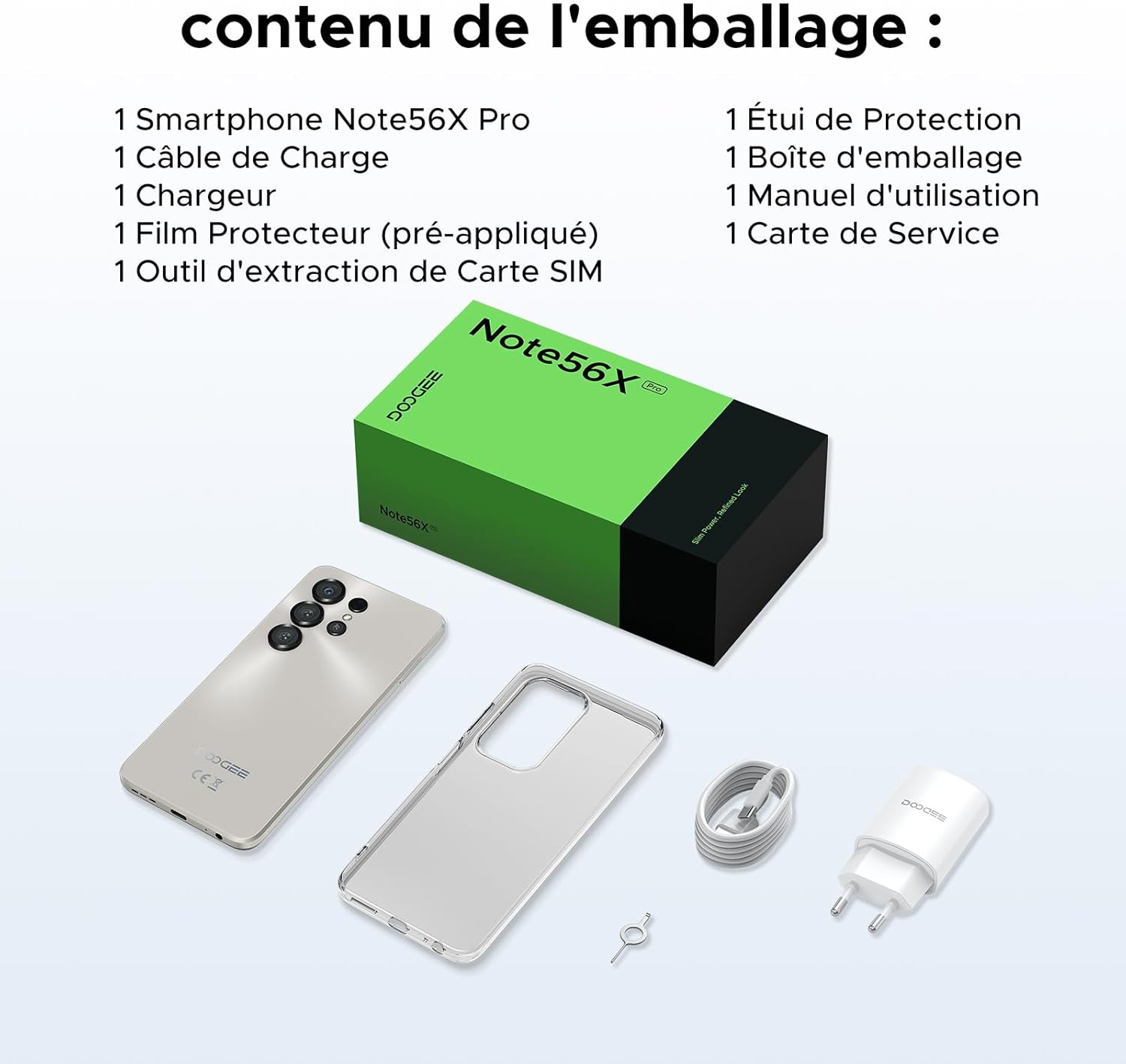
This image shows the contents included in the DOOGEE Note56X Pro packaging: the smartphone, a charging cable, a charger, a pre-applied screen protector, a SIM card ejection tool, a protective case, the packaging box, a user manual, and a service card.
3. Пачатак працы
3.1. Устаўка SIM-карт
The DOOGEE Note56X Pro supports Dual SIM functionality. To insert your SIM card(s):
- Знайдзіце латок для SIM-карты на бакавой панэлі прылады.
- Use the provided SIM ejection tool to open the tray.
- Устаўце карту (карты) Nano-SIM і/або карту microSD у латок залатымі кантактамі ўніз.
- Асцярожна ўстаўце латок назад у слот, пакуль ён не будзе ўпоравень з прыладай.
3.2. Уключэнне / выключэнне харчавання
- Каб уключыць: Press and hold the Power button until the DOOGEE logo appears.
- Каб выключыць: Press and hold the Power button until the power options appear on the screen, then select "Power off".
- Каб перазапусціць: Націсніце і ўтрымлівайце кнопку харчавання, пакуль не з'явяцца параметры харчавання, затым абярыце «Перазагрузка».
3.3. Пачатковая налада
Пасля першага ўключэння выканайце падказкі на экране, каб завяршыць пачатковую наладу:
- Выберыце сваю мову.
- Падключыцеся да сеткі Wi-Fi.
- Увайдзіце ў свой уліковы запіс Google або стварыце новы.
- Set up screen lock (PIN, pattern, password, fingerprint, or Face ID).
- Review і прыняць умовы.
4. Кіраванне прыладай
4.1. Дысплей
The Note56X Pro features a 6.56-inch HD+ IPS Waterdrop display with a 90Hz refresh rate, offering smooth visuals and vibrant colors. The 90% screen-to-body ratio provides an immersive viewвопыту.

This graphic highlights the display features of the DOOGEE Note56X Pro, including a 90Hz refresh rate for smooth visuals, support for 16.7 million colors, and a 90% screen-to-body ratio for an immersive viewвопыту.
A brief video demonstrating the smooth gaming experience on the DOOGEE Note56X Pro's 6.56-inch HD+ 90Hz display, showing responsive gameplay.
4.2. Прадукцыйнасць
Powered by an UNISOC T7225 Octa-Core processor, the Note56X Pro ensures fluid multitasking and efficient application launch. It comes with 32GB of RAM (4GB physical + 28GB virtual) and 128GB of internal storage, expandable up to 2TB via a TF card (sold separately).

This image presents a technical diagram of the UNISOC T7225 Octa-Core processor, highlighting its 1.8 GHz high frequency and Mali G57 ARM GPU, ensuring smooth performance for web browsing, online learning, and chats.

This graphic illustrates the memory configuration of the DOOGEE Note56X Pro, featuring 32GB RAM (4GB physical + 28GB virtual) and 128GB ROM, expandable up to 2TB with a TF card (sold separately), providing ampпрастора для праграм і медыя.
A short video highlighting the internal components of the DOOGEE Note56X Pro, specifically the Octa-Core UNISOC T7225 processor and the 32GB RAM (4GB + 28GB virtual) and 128GB ROM configuration.
4.3. Акумулятар
Equipped with a 6150mAh Silicon-Carbon battery, the Note56X Pro offers extended usage time and supports 5W reverse charging. The battery is designed for durability, with up to 1000 charge/discharge cycles and an estimated 4-year lifespan.

A detailed diagram showing the internal structure of the 6150mAh Silicon-Carbon battery within the DOOGEE Note56X Pro, emphasizing its extended endurance, 1000 charge/discharge cycles, 4-year lifespan, 20% reduced size, and 5W reverse charging capability.
Кароткі відэа-прэзентацыяasing the sleek design, vertical lens arrangement, ultra-thin 8.45mm body, lightweight 195g build, and available colors (Midnight Black, Glacier Blue, Titanium Grey Mist) of the DOOGEE Note56X Pro.
4.4. Фотаапарат
Capture clear and vibrant photos with the Note56X Pro's camera system:
- Асноўная камера: 13MP with AI recognition, HDR, Pro Mode, Smile Capture, Panoramas, Burst Mode, Night Mode, and Fun Filters.
- Пярэдняя камера: 8MP with Beauty Mode and Portrait Mode for natural selfies.

This graphic highlights the features of the 13MP main camera on the DOOGEE Note56X Pro, including AI recognition, HDR, Pro Mode, Smile Capture, Panoramas, Burst Mode, Night Mode, and Fun Filters, illustrated with a landscape photo taken by the phone.

This image showcases the 8MP front camera features of the DOOGEE Note56X Pro, including Beauty Mode and Portrait Mode, designed to simplify photography and produce bright, natural selfies.

This graphic details the intelligent features of the Google Smart Camera on the DOOGEE Note56X Pro, such as displaying search results, text extraction and translation, homework analysis, plant and animal identification, and online search capabilities.
4.5. Сувязь
The device supports 4G cellular networks, Wi-Fi, Bluetooth 5.0, and NFC for secure contactless payments. It also includes GPS for precise navigation and OTG functionality for connecting external devices.
4.6. Функцыі бяспекі
The Note56X Pro offers multiple security options to protect your data:
- Ідэнтыфікатар асобы: Разблакуйце тэлефон з дапамогай распазнавання твару.
- Распазнаванне адбіткаў пальцаў: A side-mounted fingerprint sensor provides quick and secure access.
- Таксама даступныя стандартныя варыянты PIN-кода, графічнага шаблону і пароля.
4.7. Operating System and AI
Running on Android 16, the Note56X Pro provides an intuitive and secure user experience. It integrates Google Gemini AI, offering intelligent assistance for various tasks.

A visual representation of the Android 16 operating system interface on the DOOGEE Note56X Pro, showcasing various application icons and a clean, intuitive user experience.

This image shows the Google Gemini AI chat interface on the DOOGEE Note56X Pro, demonstrating its capability for planning vacations, discussing current events, and practicing interview пытанні.
5. Тэхнічныя характарыстыкі
| Асаблівасць | Спецыфікацыя |
|---|---|
| Марка | ДУГІ |
| Назва мадэлі | Note56X Pro |
| Аперацыйная сістэма | Android 16 |
| Памер экрана | 6.56 цалі |
| Дазвол экрана | 720 х 1612 |
| Частата абнаўлення | 90 Гц |
| Працэсар | Васьмі'ядравы UNISOC T7225 |
| Памер усталяванай аператыўнай памяці | 32 ГБ (4 ГБ фізічнай + 28 ГБ віртуальнай) |
| Ёмістасць памяці | 128 ГБ (пашырэнне да 2 ТБ) |
| Тып батарэі | Літый-палімерны |
| Ёмістасць батарэі | 6150 мАг |
| Сотавая тэхналогія | 4G |
| Аператар бесправадной сувязі | Усе аператары (разблакіравана) |
| Сувязь | Wi-Fi, Bluetooth 5.0, NFC |
| Асаблівасці | Dual SIM, Integrated GPS, USB OTG Support, Face ID, Fingerprint Recognition |
| Аўдыёраз'ём | 3.5 мм |
| Памеры (таўшчыня) | 8.45 мм |
| Вага | 195 г |

бок view of the DOOGEE Note56X Pro, emphasizing its ultra-thin 8.45mm profile and lightweight 195g construction, designed for easy portability and comfortable handling throughout the day.

This image displays the DOOGEE Note56X Pro in its available elegant colors: Midnight Black, Titanium Grey Mist, and Glacier Blue, showcasing the aesthetic options for the device.
6. Тэхнічнае абслугоўванне
To ensure the longevity and optimal performance of your DOOGEE Note56X Pro, follow these maintenance guidelines:
- Уборка: Для чысткі экрана і корпуса выкарыстоўвайце мяккую тканіну без ворса. Пазбягайце абразіўных матэрыялаў або агрэсіўных хімічных рэчываў.
- Абнаўленні праграмнага забеспячэння: Regularly check for and install system updates to benefit from the latest features, security patches, and performance improvements. Go to Налады > Сістэма > Абнаўленне сістэмы.
- Сыход за батарэяй: Пазбягайце экстрэмальных тэмператур. Не дапускайце частай поўнай разрадкі акумулятара. Для аптымальнай зарадкі выкарыстоўвайце арыгінальную зарадную прыладу.
- Кіраванне сховішчам: Перыядычна чысціце непатрэбнае files and uninstall unused apps to free up storage space and maintain device speed.
- Абарона: Use the provided protective case and screen protector to guard against scratches and minor impacts.
7. Выпраўленне непаладак
If you encounter issues with your DOOGEE Note56X Pro, try the following solutions:
- Прылада не ўключаецца: Пераканайцеся, што акумулятар зараджаны. Падключыце зарадную прыладу і пачакайце некалькі хвілін, перш чым зноў уключыць прыладу.
- Экран не рэагуе: Force restart the device by pressing and holding the Power button for about 10-15 seconds.
- Збоі/завісанні праграм: Ачысціце кэш праблемнай праграмы (Налады > Праграмы > [Назва праграмы] > Памяць і кэш > Ачысціць кэш). Калі праблема не знікне, выдаліце і пераўсталюйце праграму.
- Дрэнны тэрмін службы батарэі: Check background app usage (Налады > Акумулятар). Reduce screen brightness, disable unused features like Wi-Fi, Bluetooth, GPS when not needed.
- Праблемы з падключэннем да сеткі: Toggle Airplane Mode on and off. Restart the device. Check SIM card insertion. Reset network settings (Налады > Сістэма > Параметры скіду > Скінуць налады Wi-Fi, мабільнай сувязі і Bluetooth).
- Fingerprint/Face ID Not Working: Ensure your fingers are clean and dry for fingerprint scanning. For Face ID, ensure adequate lighting and that your face is clearly visible to the front camera. Re-register your fingerprint or face if necessary.
- Нізкая прадукцыйнасць: Зачыніце невыкарыстоўваныя фонавыя праграмы. Ачысціце кэш і часовую памяць. files. Consider a factory reset as a last resort (Налады > Сістэма > Параметры скіду > Сцерці ўсе даныя (скід да заводскіх налад) - Заўвага: Гэта сатрэ ўсе дадзеныя на вашым тэлефоне. Спачатку зрабіце рэзервовую копію важнай інфармацыі.).
8. Гарантыя і падтрымка
Your DOOGEE Note56X Pro comes with a 24-month warranty and a 30-day return policy. For any questions or assistance, please contact DOOGEE customer service via Amazon. Our dedicated support team is available to help you.

This image displays DOOGEE's customer service commitments: a 30-day money-back and free return guarantee, a 2-year limited warranty, and 24/7 online individual assistance.


