1. Уводзіны
Thank you for choosing the Eureka N6 Plus Robot Vacuum Cleaner. This manual provides essential information for the safe operation, maintenance, and troubleshooting of your device. Please read it thoroughly before use and keep it for future reference. The Eureka N6 Plus combines powerful suction, intelligent navigation, and convenient app control to deliver an efficient and effortless cleaning experience for modern homes.
2. Інструкцыі па тэхніцы бяспекі
To reduce the risk of injury or damage, read and follow all safety precautions.
- Гэтым прыборам могуць карыстацца дзеці ва ўзросце ад 8 гадоў і асобы з паніжанымі фізічнымі, сэнсарнымі або разумовымі здольнасцямі або з адсутнасцю вопыту і ведаў, калі яны знаходзяцца пад наглядам або атрымалі інструкцыі адносна бяспечнага выкарыстання прыбора і разумеюць звязаныя з гэтым небяспекі .
- Не дазваляйце дзецям гуляць з прыладай. Дзеці не павінны выконваць чыстку і абслугоўванне без нагляду.
- Use only the original power adapter and charging base provided by the manufacturer.
- Do not use the robot to pick up large objects, sharp debris, liquids, or burning/smoking materials.
- Ensure the robot operates on stable, level surfaces. Avoid operating near stairs or elevated areas without proper barriers.
- Трымайце валасы, свабодную вопратку, пальцы і ўсе часткі цела далей ад адтулін і рухомых частак.
- Не апускайце робата або яго зарадную базу ў ваду або іншыя вадкасці.
- Before cleaning or performing maintenance, ensure the robot is turned off and disconnected from the power supply.
- Store the robot in a dry, cool place when not in use.
3. Змесціва ўпакоўкі
Пры распакаванні пераканайцеся, што ўсе кампаненты наяўныя і знаходзяцца ў добрым стане.
- Eureka N6 Plus Robot Vacuum Cleaner
- Self-emptying Charging Base
- Адаптар сілкавання
- Кіраўніцтва па эксплуатацыі
4. Прадукт скончыўсяview
Familiarize yourself with the main components of your Eureka N6 Plus robot vacuum cleaner and its self-emptying base.
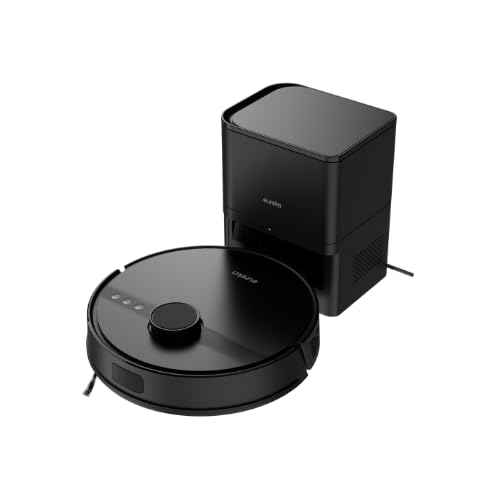
Image 4.1: Eureka N6 Plus Robot Vacuum Cleaner with its self-emptying base and a smartphone displaying the control app interface. The robot is dark grey with a central button, and the base is a matching dark grey tower.

Малюнак 4.2: Зверху ўніз view of the Eureka N6 Plus Robot Vacuum Cleaner, highlighting the integrated water tank for mopping functionality. The robot is black with a central LiDAR sensor and control buttons.
Кампаненты робата:
- Датчык LiDAR: Для дакладнай навігацыі і картаграфіі.
- Кнопкі кіравання: Power/Start, Home/Recharge.
- Dustbin/Water Tank: Integrated for vacuuming and mopping.
- Бакавыя шчоткі: Каб прыбраць смецце з краёў і кутоў.
- Асноўная шчотка: Anti-tangle design for effective cleaning.
- Датчыкі абрыву: To prevent falls from stairs.
- Кантакты для зарадкі: For connection to the charging base.
Self-Emptying Charging Base:
- Dust Bag Compartment: Houses the 2.5-liter disposable dust bag.
- Док-станцыя для зарадкі: Where the robot returns to charge and empty its dustbin.
- Індыкатар харчавання: Паказвае стан зарадкі.
5. Настройка
5.1 Размяшчэнне зараднай базы
- Place the self-emptying charging base against a wall in an open area.
- Ensure there is at least 0.5 meters (1.6 feet) of clear space on both sides and 1.5 meters (4.9 feet) in front of the base.
- Падключыце адаптар сілкавання да зараднай базы і ўключыце яго ў разетку.
- Ensure the power cable is neatly arranged to prevent the robot from tangling.
5.2 Першапачатковая зарадка
- Place the robot onto the charging base. Ensure the charging contacts on the robot align with those on the base.
- The robot will automatically begin charging. Allow it to fully charge before its first use (approximately 4-6 hours). The indicator light on the robot will change to indicate a full charge.
5.3 Падключэнне праграмы
- Download the "Eureka Robot" app from your smartphone's app store (available for iOS and Android).
- Адкрыйце праграму і стварыце ўліковы запіс.
- Follow the in-app instructions to add your Eureka N6 Plus robot. This typically involves connecting to the robot's Wi-Fi hotspot temporarily and then connecting it to your home Wi-Fi network.
- Once connected, you can control the robot, schedule cleanings, adjust settings, and view cleaning maps from your smartphone.
6. Інструкцыя па эксплуатацыі
6.1 Запуск цыкла ачысткі
- Ручной запуск: Press the Power/Start button on the robot once. The robot will begin cleaning in Auto mode.
- Запуск праграмы: Open the "Eureka Robot" app, select your device, and tap the 'Start' or 'Clean' button. You can also select specific cleaning modes or areas.
6.2 Прыпыненне/прыпыненне цыклу мыцця
- Press the Power/Start button on the robot once to pause. Press again to resume.
- Use the 'Pause' or 'Stop' button in the app.
6.3 Вяртанне на зарадную базу
- Press the Home/Recharge button on the robot.
- Use the 'Recharge' or 'Dock' button in the app. The robot will automatically return to its charging base.
6.4 Функцыя мыцця
The Eureka N6 Plus features a simultaneous vacuuming and mopping function.
- Fill the integrated water tank with clean water. Do not use detergents or cleaning solutions not approved for robot vacuums.
- Attach the mopping pad securely.
- In the app, you can select the desired water flow level (three adjustable levels) suitable for different hard floor types.
- The robot will vacuum and mop simultaneously.
6.5 Кіраванне галасавым памочнікам
The Eureka N6 Plus supports voice control via Alexa and Google Assistant.
- Enable the "Eureka Robot" skill/action in your Alexa or Google Home app.
- Link your Eureka Robot account.
- Use commands such as "Alexa, tell Eureka Robot to start cleaning" or "Hey Google, ask Eureka Robot to go home."
7. Тэхнічнае абслугоўванне
Рэгулярнае тэхнічнае абслугоўванне забяспечвае аптымальную прадукцыйнасць і падаўжае тэрмін службы вашага робата-пыласоса.
7.1 Self-Emptying Dust Bag (Base)
- The 2.5-liter dust bag in the self-emptying base should be replaced when full. The app will notify you.
- Open the top cover of the charging base, remove the full bag, and insert a new one.
7.2 Робат-пыласомістка і фільтр
- Even with the self-emptying feature, it is recommended to periodically check and manually empty the robot's internal dustbin.
- Clean the HEPA filter regularly by tapping it to remove dust. Replace the filter every 3-6 months, depending on usage. Do not wash the HEPA filter with water.
7.3 Асноўная шчотка і бакавыя шчоткі
- Асноўная шчотка: Зніміце вечка асноўнай шчоткі і выміце яе. Выкарыстоўвайце інструмент для чысткі, каб выдаліць валасы і смецце, якія заблыталіся вакол шчоткі.
- Бакавыя шчоткі: Check side brushes for wear or damage. Remove any tangled hair. Replace if bristles are bent or missing.
7.4 Датчыкі і зарадныя кантакты
- Wipe all sensors (cliff sensors, wall sensors, LiDAR sensor window) and charging contacts on both the robot and the base with a clean, dry cloth.
7.5 Рэзервуар для вады і швабра для мыцця падлогі
- Пасля кожнага сеансу мыцця падлогі злівайце рэшткі вады з бачка.
- Clean the mopping pad thoroughly and allow it to air dry before storing.
8. Выпраўленне непаладак
If you encounter issues with your Eureka N6 Plus, refer to the following common problems and solutions.
| праблема | Магчымая прычына | Рашэнне |
|---|---|---|
| Робат не ўключаецца | Нізкі зарад батарэі; кнопка харчавання не націснутая; робат захрас. | Зарадзіце робата; націсніце і ўтрымлівайце кнопку харчавання; прыбярыце ўсе перашкоды. |
| Робат не можа знайсці зарадную базу | Base obstructed; Base not powered; Robot too far. | Ensure clear space around base; Check power connection; Manually place robot near base. |
| Дрэнная прадукцыйнасць ачысткі | Full dustbin/dust bag; Clogged filter; Tangled brushes. | Empty dustbin/replace dust bag; Clean/replace filter; Clean main and side brushes. |
| Праблемы з падключэннем праграмы | Няправільны пароль Wi-Fi; маршрутызатар занадта далёка; робат не ў сетцы. | Verify Wi-Fi credentials; Move robot closer to router; Restart robot and router. |
| Робат часта захрасае | Obstacles on floor; Dark surfaces triggering cliff sensors. | Clear cables, toys, and small objects; Use no-go zones in app for problematic areas. |
9. Тэхнічныя характарыстыкі
Detailed technical specifications for the Eureka N6 Plus Robot Vacuum Cleaner.
| Асаблівасць | Спецыфікацыя |
|---|---|
| Марка | ЭЎРЫКА |
| Назва мадэлі | N6 Plus Black |
| Памеры (Д х Ш х У) | 35 Д x 35 Ш x 41.1 У см |
| Вага прадмета | 5.5 кілаграма |
| Тып батарэі | Літый-іённы |
| тtage | 14.4 вольт |
| Тэрмін службы батарэі | Up to 120 minutes (continuous cleaning) |
| Магутнасць ўсмоктвання | Approximately 5000 Pa |
| Ёмістасць пылазборніка (аснова) | 2.5 літра |
| Тып фільтра | HEPA |
| Тып навігацыі | Датчык LiDAR |
| Метад кантролю | App Control, Voice Control (Alexa, Google Assistant) |
| Асаблівасці | Self-emptying base, Simultaneous vacuuming and mopping, Anti-tangle brush, Three adjustable water levels |
| Рэкамендуемыя паверхні | Усе тыпы падлог |
10. Гарантыя і падтрымка
10.1 Інфармацыя аб гарантыі
The Eureka N6 Plus Robot Vacuum Cleaner comes with a manufacturer's warranty. Please refer to the warranty card included in your package for specific terms and conditions. Spare parts availability in the EU is guaranteed for 3 years.
10.2 Падтрымка кліентаў
For technical assistance, warranty claims, or general inquiries, please contact Eureka customer support through the following channels:
- Webсайт: Visit the official Eureka webсайт з часта задаванымі пытаннямі і рэсурсамі падтрымкі.
- электронная пошта: Refer to your warranty card or the Eureka webсайт для атрымання адпаведнага адраса электроннай пошты службы падтрымкі.
- тэлефон: Contact numbers for your region can be found on the Eureka webсайт.
Please have your model number (N6 Plus Black) and purchase information ready when contacting support.


