1. Уводзіны
Дзякуй за пакупкуasing the Nakamichi ELITE OWS100 Open-Ear Bluetooth 5.4 Headphones. This manual provides essential information for the safe and effective use of your device. Please read it thoroughly before use and retain it for future reference.
2. Інфармацыя па бяспецы
- Не падвяргайце навушнікі або зарадны футляр уздзеянню экстрэмальных тэмператур, вільготнасці або вадкасцей.
- Не кідайце прыладу і не падвяргайце яе моцным ударам.
- Do not attempt to disassemble or modify the earphones or charging case. This may void the warranty and cause damage.
- Захоўваць у месцах, недаступных дзецям і хатнім жывёлам.
- Выкарыстоўвайце толькі кабель для зарадкі, які ўваходзіць у камплект.
- When using the earphones in traffic or other potentially hazardous environments, ensure you can hear surrounding sounds to maintain safety.
3. Змесціва ўпакоўкі
Праверце наяўнасць усіх прадметаў у камплекце:
- Nakamichi ELITE OWS100 Open-Ear Headphones (Left and Right)
- Чахол для зарадкі
- USB-кабель для зарадкі
- Інструкцыя па эксплуатацыі (гэты дакумент)
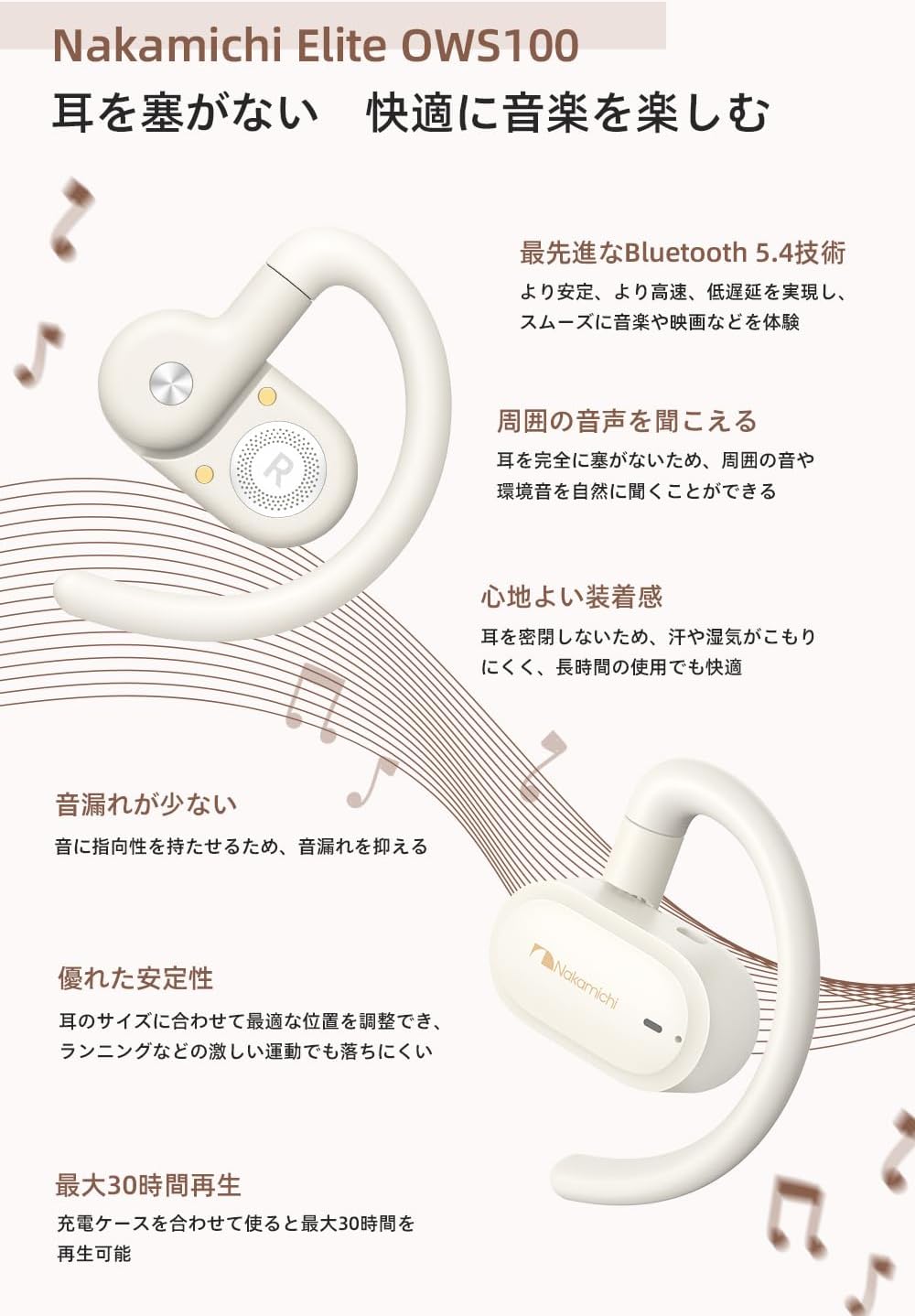
Image: Nakamichi ELITE OWS100 headphones and charging case. The image shows the beige open-ear headphones resting inside their matching charging case, with the lid open.
4. Прадукт скончыўсяview
Familiarize yourself with the components of your Nakamichi ELITE OWS100 headphones.

Image: Close-up of a single Nakamichi ELITE OWS100 earbud. This image highlights the speaker and ear hook design.
- Дынамік: Delivers audio.
- Завушны кручок: Secures the earphone over the ear.
- Вобласць сэнсарнага кіравання: For various functions (play/pause, skip, answer calls).
- Мікрафон: Для званкоў і галасавых каманд.
- Кантакты для зарадкі: Падключаецца да зараднага чахла.
- Чахол для зарадкі: Stores and charges the earphones.
- Charging Port (on case): Для падключэння USB-кабеля для зарадкі.
5. Пачатак працы
5.1 Першапачатковая зарадка
Перад першым выкарыстаннем пераканайцеся, што навушнікі і зарадны футляр цалкам зараджаны.
- Remove the protective film from the charging contacts on both earbuds.
- Устаўце навушнікі ў зарадны футляр, пераканаўшыся, што яны правільна ўсталяваныя.
- Падключыце кабель зарадкі USB да порта зарадкі на корпусе і крыніцы харчавання.
- The indicator lights on the case will show the charging status. A full charge typically takes approximately 2 hours for the case.
5.2 Уключэнне/выключэнне сілкавання
- Уключэнне: Адкрыйце зарадны футляр, і навушнікі аўтаматычна ўключацца. Акрамя таго, можна націснуць і ўтрымліваць сэнсарную вобласць кіравання на абодвух навушніках на працягу 3 секунд.
- Выключэнне: Place the earbuds back into the charging case and close the lid. Alternatively, disconnect them from Bluetooth, and they will power off automatically after a few minutes, or press and hold the touch control area for 5 seconds.
6. Нашэнне навушнікаў
For optimal sound and comfort, adjust the earphones to fit your ears.
- Вызначце левы (L) і правы (R) навушнікі.
- Hook the earphone over your ear, positioning the speaker unit near your ear canal without blocking it.
- Adjust the angle of the ear hook and speaker unit to achieve a secure and comfortable fit. The ear hooks are designed to be flexible for individual ear shapes.

Image: Diagram illustrating the adjustable angles of the ear hooks (50°, 10°, 75°). This shows how the ear hook can be rotated to fit different ear shapes for a secure and comfortable wearing experience.
The open-ear design ensures comfort during long periods of use by reducing stuffiness, pain, and itchiness often associated with in-ear models.
7. Спалучэнне з прыладамі
7.1 Першае спалучэнне
- Адкрыйце зарадны кейс. Навушнікі аўтаматычна пяройдуць у рэжым спалучэння, пра што будзе сведчыць мігценне святлодыёдаў.
- На вашай прыладзе (смартфоне, планшэце, ноўтбуку) уключыце Bluetooth.
- Пошук available Bluetooth devices and select "Nakamichi ELITE OWS100" from the list.
- Пасля падключэння індыкатары навушнікаў перастануць міргаць, і вы пачуеце гукавое пацверджанне.
7.2 Паўторнае падключэнне
The earphones will automatically reconnect to the last paired device when taken out of the charging case, provided Bluetooth is enabled on the device and it is within range.
8. Элементы кіравання (сэнсарнае кіраванне)
The Nakamichi ELITE OWS100 features intuitive touch controls on each earbud.
| Функцыя | Дзеянне |
|---|---|
| Прайграванне/Паўза | Адзін націск на любы навушнік |
| Наступны трэк | Двойчы націсніце на правы навушнік |
| Папярэдні трэк | Двойчы націсніце на левы навушнік-ўкладыш |
| Адказаць/завяршыць выклік | Адзін націск на любы навушнік |
| Адхіліць выклік | Націсніце і ўтрымлівайце любы навушнік на працягу 2 секунд |
| Актывуйце галасавой памочнік | Тройчы націсніце на любы навушнік |
| Павялічыць гучнасць | Press and hold on the right earbud |
| Памяншэнне гучнасці | Press and hold on the left earbud |
9. Гукавыя функцыі
9.1 Open-Ear Audio Experience
The ELITE OWS100 features a 14.2mm dynamic driver that delivers a spacious and natural sound. Unlike traditional in-ear headphones, sound is transmitted through the air around your ear, providing a wider soundstage and allowing you to remain aware of your surroundings.

Image: A man wearing the Nakamichi ELITE OWS100 headphones, with visual representations of sound waves emanating from the earbuds, illustrating the open-ear audio experience and bass enhancement.
9.2 Bass Correction Algorithm
Integrated innovative bass correction algorithms enhance the low-frequency range, providing rich and deep bass for a more dynamic and immersive audio experience, especially for music genres like EDM and Hip-Hop.
9.3 Sound Leakage Prevention
Utilizing directional sound transmission technology, the ELITE OWS100 minimizes sound leakage. This ensures that your audio remains private, even in close proximity to others, making them suitable for public spaces and offices.

Image: A diagram illustrating how directional sound transmission technology works to prevent sound leakage from the open-ear headphones, showing sound waves directed towards the ear canal.
10. Функцыі выкліку
The earphones are equipped with dual microphones and directional sound transmission technology for clear communication.
- Ачысціць выклікі: The microphones effectively reduce ambient noise, ensuring your voice is clearly transmitted to the other party.
- Прыватнасць выкліку: Directional sound transmission minimizes the risk of your conversation being overheard by others, providing privacy in public or office settings.

Image: A woman smiling and using the Nakamichi ELITE OWS100 headphones while on a call, demonstrating the clear call feature.
11. Шматкропкавае злучэнне
The ELITE OWS100 supports multipoint connection, allowing you to connect to two devices simultaneously.
- Падключыце навушнікі да першай прылады (напрыклад, смартфона).
- Адключыце навушнікі ад налад Bluetooth першай прылады (не адключайце пару).
- Падключыце навушнікі да другой прылады (напрыклад, ноўтбука).
- Reconnect the earphones to the first device from its Bluetooth settings.
The earphones will now be connected to both devices, allowing you to seamlessly switch audio sources without re-pairing.

Image: The Nakamichi ELITE OWS100 headphones and charging case shown near a smartphone and a laptop, illustrating the multipoint connection feature where the headphones can be simultaneously connected to two devices.
12. Акумулятар і зарадка
12.1 Тэрмін службы батарэі
- Earbuds Only: Approximately 7 hours of continuous playback on a single full charge.
- З чахлом для зарадкі: Up to approximately 30 hours of total playback time.
12.2 Зарадка корпуса
Connect the provided USB charging cable to the charging port on the case and a compatible USB power adapter (not included). The indicator lights will show the charging status. The case takes approximately 2 hours to fully charge.

Image: A visual representation of the battery life, showing the earbuds providing 7 hours of playback and the charging case extending the total to 30 hours.
13. Тэхнічнае абслугоўванне
- Рэгулярна працірайце навушнікі і зарадны футляр мяккай, сухой тканінай без ворса.
- Не выкарыстоўвайце агрэсіўныя хімічныя рэчывы, ачышчальныя растваральнікі або моцныя мыйныя сродкі.
- Каб забяспечыць належную зарадку, падтрымлівайце зарадныя кантакты на навушніках і ўнутры футляра чыстымі і сухімі.
- Захоўвайце навушнікі ў зарадным чахле, калі яны не выкарыстоўваюцца, каб абараніць іх ад пылу і пашкоджанняў.
14. Выпраўленне непаладак
| праблема | Магчымае рашэнне |
|---|---|
| Навушнікі не ўключаюцься. | Ensure earbuds are charged. Place them in the charging case and charge the case. |
| Немагчыма спалучыць прыладу. | Ensure Bluetooth is enabled on your device. Make sure earbuds are in pairing mode. Forget the device in your Bluetooth settings and try pairing again. |
| Няма гуку або нізкі ўзровень гучнасці. | Check volume levels on both the earphones and your connected device. Ensure earphones are properly seated on your ears. |
| Абрэзка/зніжэнне гуку. | Ensure you are within Bluetooth range (typically 10 meters/33 feet) of your device. Avoid obstacles between the earphones and your device. |
| Навушнікі не зараджаюцца ў кейсе. | Ensure protective film is removed from earbuds. Clean charging contacts on both earbuds and case. Ensure the charging case itself is charged. |
15. Тэхнічныя характарыстыкі
| Асаблівасць | Дэталь |
|---|---|
| Нумар мадэлі | ELITE OWS100 |
| Версія Bluetooth | 5.4 |
| Размяшчэнне вушэй | Адкрытае вуха |
| Памер драйвера | 14.2 мм дынамічны драйвер |
| АЧХ | 20 кГц |
| Адчувальнасць | 100 дБ |
| Імпеданс | 32 Ом |
| Тып кіравання | Touch Control, Gesture |
| Час прайгравання навушнікаў | Прыбл. 7 гадзіны |
| Агульны час прайгравання (з кейсам) | Прыбл. 30 гадзіны |
| Час зарадкі (чахол) | Прыбл. 2 гадзіны |
| Вага прадмета | 76 грамаў |
| Памеры прадукту | 10.3 х 5.5 х 2.48 см |
| Сумяшчальныя прылады | Gaming consoles, Tablets, Desktop PCs, Laptops, Mobile phones |
16. Гарантыя і падтрымка
The Nakamichi ELITE OWS100 Open-Ear Bluetooth 5.4 Headphones come with a 1-year manufacturer's warranty from the date of purchase.
If you encounter any issues or have questions regarding your product, please contact Nakamichi customer support for assistance. Please retain your proof of purchase for warranty claims.


